> For the complete documentation index, see [llms.txt](https://help.xaman.app/app/llms.txt). Markdown versions of documentation pages are available by appending `.md` to page URLs; this page is available as [Markdown](https://help.xaman.app/app/release-notes/previous-releases/updating-to-xumm-v2.4.md).
# Updating to Xumm v2.4
New features, updates and more..
### Welcome to the latest version!
If you are interested in learning about some of the main changes and features of Xumm v2.4, you're at the right place!
This version includes many different upgrades, new features, tweaks and improvements and while many of them are "behind the scene" improvements, there are some things you will notice and appreciate right away, so let's get started...
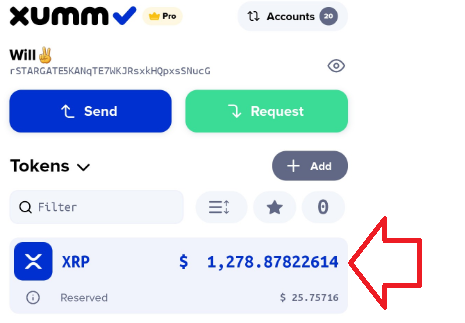
### Get the value of your XRP on the main screen
When our customers speak, we listen, so when you asked for Xumm to display the fiat value of your XRP on the main page, we added it. Just touch the balance of your XRP and voila, the cash equivalent.
### Improved NFT handling
Would you like to see a list of all the NFTs that you own? Would you like to view themin Xumm? How about the ability to view your buy and sell NFT orders? Well, now you can.\
\
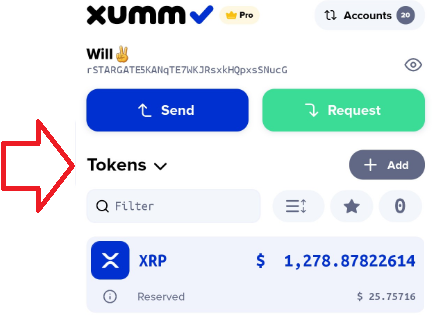
Simply press the **Tokens** button..
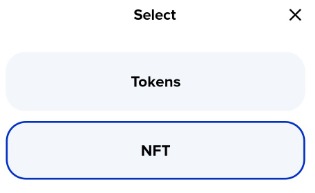
Then choose **NFT**...
and...
If you are interested in learning more about how Xumm interacts with NFTs, check out this article:
* [**About NFTs**](/app/learning-more-about-xaman/nfts.md)
### Improved security
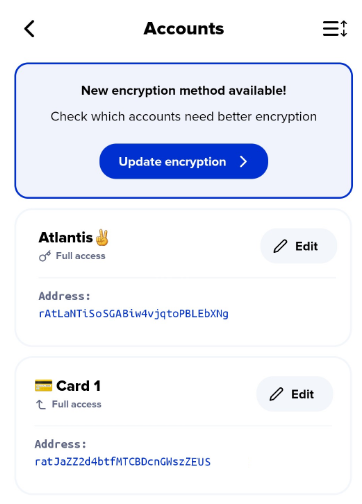
We've improved our encryption algorithms in this version of Xumm! If you would like to upgrade the encryption on your accounts, simply press the **Settings** button then choose **Accounts** and press the **Update encryption** button.
For more information on this, check out his article:
[**Upgrading your encryption**](/app/security-and-xaman/all-about-security/upgrading-your-encryption.md)
### More control over Third party apps
This version includes the ability to **revoke access** from third party sites and xApps.
In Xumm, press **Settings** then **Third party apps** to get a list of apps / sites from which you can revoke access.
This was just a quick overview of a couple of the new features in this release but there are more if you are interested. Check out our release notes for more details:
* [**Xumm v2.4 Release notes**](/app/release-notes/previous-releases/xumm-v2.4.md)
###
###
###
###
###
###
###
###
###
###
###
###
###
###
###
###
###
###
###
###
###
###
###
###
###
###
###
###
###
###
###
###
###
---
# Agent Instructions
This documentation is published with GitBook. GitBook is the documentation platform designed so that both humans and AI agents can read, navigate, and reason over technical content effectively. Learn more at gitbook.com.
## Querying This Documentation
If you need additional information that is not directly available in this page, you can query the documentation by asking a question.
Perform an HTTP GET request on the following URL with the `ask` and `goal` query parameters:
```
GET https://help.xaman.app/app/release-notes/previous-releases/updating-to-xumm-v2.4.md?ask=&goal=
```
`ask` is the immediate question: it should be specific, self-contained, and written in natural language.
`goal` is what the user is ultimately trying to achieve, the reason they need the answer. Sharing it helps GitBook give you a better, more relevant answer. A goal is most helpful when it describes the outcome the user wants rather than restating the question. For example, with `ask=how do I create an API token`, a goal like `automate deployments from our CI pipeline` lets GitBook tailor the answer to that use case.
The response will contain a direct answer to the question and relevant excerpts and sources from the documentation.
Use this mechanism when the answer is not explicitly present in the current page, you need clarification or additional context, or you want to retrieve related documentation sections.