> For the complete documentation index, see [llms.txt](https://help.xaman.app/app/llms.txt). Markdown versions of documentation pages are available by appending `.md` to page URLs; this page is available as [Markdown](https://help.xaman.app/app/learning-more-about-xaman/how-to-convert-a-read-only-account-to-full-access.md).
# How to convert a Read only account to Full access
Change a Read only account to Full access by entering the correct account secret for that account.
In Xaman, you can import an XRP Ledger account in Full access mode or Read only mode. The mode tells you whether Xaman has a working path to get a signature for the account.
* **Full access:** Xaman has a working path to get a signature. You can send XRP, sign requests, and receive XRP.
* **Read only:** Xaman does not hold the account secret. You can view the balance and activity, and receive XRP. You cannot send or sign. If you have set up a regular key that Xaman can use, you can still sign.
### Before you start: you need the correct account secret
When you convert an account, you must enter the correct account secret for that account. Xaman checks the account secret against the account. If they do not match, the conversion stops.
This is the most common reason a conversion fails. Many people are sure they have the right account secret, but the secret they enter points to a different r-address. When that happens, the account secret belongs to another account, not the one you are converting.
* If you enter an account secret and Xaman shows a different r-address, that secret is not for this account. The correct secret always produces the same r-address.
* If you are not sure you have the correct account secret, read the section at the end of this article before you start.
### Steps to convert
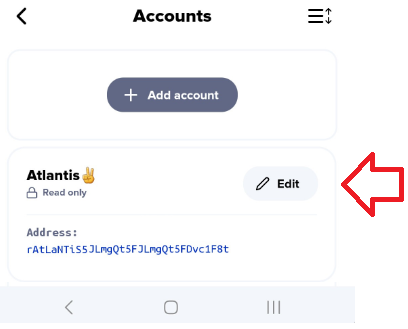
1. Launch Xaman. Press the **Settings** button. Choose **Accounts**. Press the **Edit** button beside the account you want to convert.
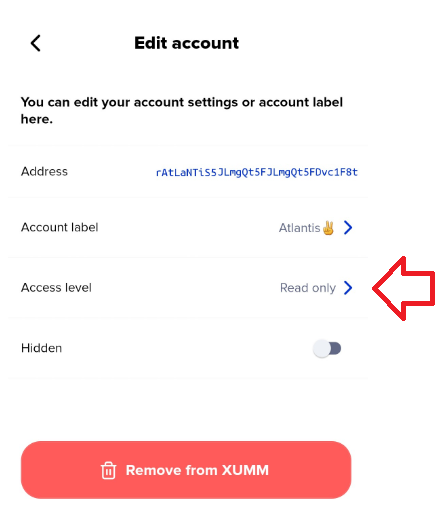
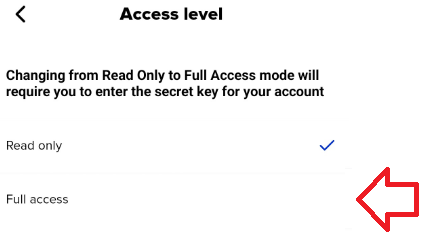
2\) Tap the **Access level** option...
then choose **Full access**.
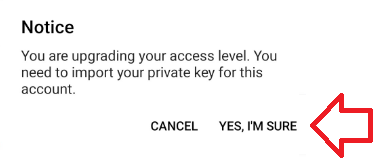
3\) Press **Yes, I'm sure**.
4\) Choose the account secret type for your account.
Xaman supports all industry-standard account secret types. When you created your account, you received one of them. Choose the type that matches your account, then follow that article to finish the import.
* **Secret Numbers:** [How to import your Secret Numbers](https://help.xaman.app/app/getting-started-with-xaman/importing-your-account/...with-secret-numbers.md)
* **Family Seed:** [How to import your Family Seed](https://help.xaman.app/app/getting-started-with-xaman/importing-your-account/...with-a-family-seed.md)
* **Mnemonic:** [How to import your Mnemonic](https://help.xaman.app/app/getting-started-with-xaman/importing-your-account/...with-a-mnemonic.md)
### What if you do not have your account secret?
An account secret is the private key to your account. It is the only way to get full control of the account. The XRP Ledger has no administrator function and no back door. No one can open the account without the correct account secret.
Two facts matter here:
* **Xaman cannot display or recover an account secret.** Xaman is built so that it never shows them. If you lose the account secret, Xaman cannot give it back to you.
* **You cannot convert to Full access without it.** The conversion needs the correct account secret. If you do not have it, you cannot complete the conversion.
If you do not have your account secret, read [I've lost my account secret!](https://help.xaman.app/app/learning-more-about-xaman/ive-lost-my-account-secret). That article covers all of your options. The short list:
* **You still have signing access on a device:** create a new account in Xaman, activate it with 1 XRP, and move your assets over with the **Send** feature.
* **Your account is on a Xaman card (Tangem):** the card is the key. Tap it to your phone and sign. There are no secret numbers to lose.
* **You configured a regular key:** you can still sign with the regular key even without the original account secret.
* **Someone else has a copy:** if you shared the account secret with a family member or a trusted person, you can use their copy.
#### Be careful of "recovery" scammers
If you post online that you lost your account secret, people will message you and claim they can recover it for a fee. **They cannot.** No tool, no service, and no person can derive your private key from your r-address. Anyone who claims otherwise is trying to scam you. Do not send them XRP, do not give them your address, and do not download any tool they send you.
### *Frequently asked questions*
***I am sure my account secret is correct. Why does Xaman show a different account?***
When you enter an account secret, Xaman opens the account that the secret belongs to. If Xaman shows a different r-address, the secret you entered belongs to a different account, not the one you want to convert.
The correct account secret always produces the same r-address, with your balance and tokens in place. If you get a different r-address, consider the possibility that you have the wrong account secret, or that the one you have is for a different account.
***I went through KYC and I can prove I own the account. Does that help?***
No. The XRP Ledger has no central authority and no way to link your identity to your private keys. The KYC process does not give anyone access to your account. The only way to access an XRP Ledger account is with the correct account secret.
***Can Xaman give me my account secret back?***
No. Xaman cannot display or recover an account secret. See [Can I view/export my account secret?](https://help.xaman.app/app/learning-more-about-xaman/can-i-view-export-my-account-secret.md).
### See also
* [I've lost my account secret!](https://help.xaman.app/app/learning-more-about-xaman/ive-lost-my-account-secret)
* [Can I view/export my account secret?](https://help.xaman.app/app/learning-more-about-xaman/can-i-view-export-my-account-secret)
---
# Agent Instructions
This documentation is published with GitBook. GitBook is the documentation platform designed so that both humans and AI agents can read, navigate, and reason over technical content effectively. Learn more at gitbook.com.
## Querying This Documentation
If you need additional information that is not directly available in this page, you can query the documentation by asking a question.
Perform an HTTP GET request on the following URL with the `ask` and `goal` query parameters:
```
GET https://help.xaman.app/app/learning-more-about-xaman/how-to-convert-a-read-only-account-to-full-access.md?ask=&goal=
```
`ask` is the immediate question: it should be specific, self-contained, and written in natural language.
`goal` is what the user is ultimately trying to achieve, the reason they need the answer. Sharing it helps GitBook give you a better, more relevant answer. A goal is most helpful when it describes the outcome the user wants rather than restating the question. For example, with `ask=how do I create an API token`, a goal like `automate deployments from our CI pipeline` lets GitBook tailor the answer to that use case.
The response will contain a direct answer to the question and relevant excerpts and sources from the documentation.
Use this mechanism when the answer is not explicitly present in the current page, you need clarification or additional context, or you want to retrieve related documentation sections.