> For the complete documentation index, see [llms.txt](https://help.xaman.app/app/llms.txt). Markdown versions of documentation pages are available by appending `.md` to page URLs; this page is available as [Markdown](https://help.xaman.app/app/learning-more-about-xaman/how-to-delete-an-xrpl-account.md).
# How to delete an XRPL account
How to delete an account from the XRP Ledger and get back most of your reserve
Deleting an XRPL account removes it from the XRP Ledger and sends its remaining XRP to another account.
#### Before you start
The XRP Ledger only lets you delete an account when all of these are true:
* **The account holds no tokens.** Send or sell any token balances, then remove the trust lines.
* **The account holds no NFTs.** Sell, transfer, or burn them first.
* **Every NFT the account ever minted has been burned,** even ones you no longer own.
* **The account has no open escrows, checks, or payment channels.**
* **The account was activated at least 15 minutes ago.** Brand-new accounts cannot be deleted right away.
Also make sure the account that will receive your XRP **already exists** (is activated) and is **your own account**, not an exchange.
#### How to delete your account
1. Go to [XRP Ledger Services](https://xrpl.services/).
2. Tap the **Sign in** button, and sign in with Xaman using the account you want to delete.
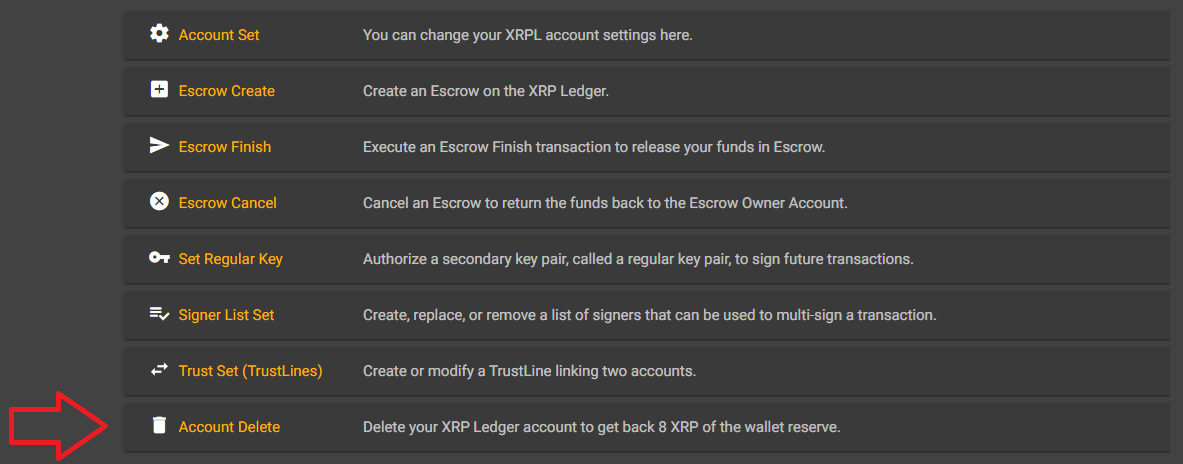
3. Select **Account delete**.
4. Enter the r-address of the account that will receive your XRP. (We recommend another account of your own in Xaman.) The **Destination Tag** field is optional. Only fill it in if the receiving account requires one.
5. Tick the box confirming that you are not sending to an exchange or other custodial wallet, then tap the **Send Account Delete** button.
6. Sign the transaction in Xaman.
{% hint style="info" %}
**Deleting a Xaman card account?** Sign the transaction with your card, just like any other transaction. If the account has a Backup card linked, the link is removed along with the account. You do not need to remove it first.
{% endhint %}
#### Important things to know
* **Deleting an account costs 0.2 XRP.** This is a special network fee, in addition to the normal transaction fee. You receive the rest of your XRP balance. For example, an account holding only its 1 XRP reserve returns about 0.8 XRP. The fee is set by the network and can change over time.
* **The receiving account must already be activated.** You cannot use an account deletion to activate a new account. If you try, the transaction fails, and you are **still charged** the 0.2 XRP fee.
* **Do not send your XRP to an exchange.** Many exchanges and other custodial wallets **do not** credit XRP that arrives from an account deletion, and you may lose it. Send it to another account of your own in Xaman instead. If you want the XRP on an exchange, send it there afterward as a normal payment.
* **Keep your account secret, or your card.** Even after you delete an account, someone could still send XRP to its address later. That brings the account back, and you will need the same account secret or Xaman card to reach those funds. Do not throw either away.
#### Frequently asked questions
**I removed my account from Xaman. Why didn't I get the reserve back?**
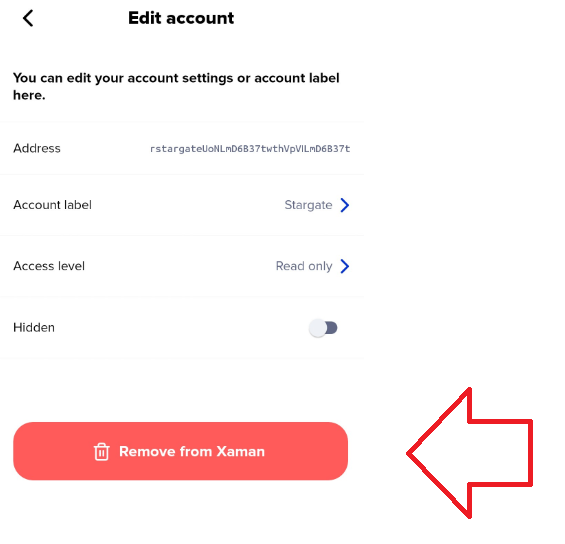
Removing an account from Xaman (**Settings**, then **Accounts**, then **Edit**, then **Remove from Xaman**) is **not** the same as deleting it from the XRP Ledger.
When you remove an account from Xaman, its account secret is deleted from the app, but the account still exists on the XRP Ledger, with all of its funds. To get your reserve back, you need to delete the account using the steps above.
{% hint style="warning" %}
**Removed an account by mistake?** You can add it back to Xaman with its account secret (Secret Numbers, Family Seed, or Mnemonic). See [Importing your account into Xaman](https://help.xaman.app/app/getting-started-with-xaman/importing-your-account)..
{% endhint %}
**I deleted my account and sent the XRP to an exchange that does not support it. What now?**
Contact your exchange or wallet and explain what happened. They will need to find your XRP in their system and credit it to your account.
Unfortunately, **Xaman Support cannot help** in this case. Only your exchange or wallet can credit those funds to you.
**Can I delete my account if I still have NFTs in it?**
No. An account cannot hold any NFTs when you delete it. Sell, transfer, or burn your NFTs first. If you are not sure how to do this, ask the marketplace or project where you got them.
**I removed all my NFTs, but I still cannot delete my account**
If your account ever **minted** an NFT, every NFT it minted must be burned before you can delete the account, even NFTs that someone else owns now. This is a rule of the XRP Ledger, and there is no way around it. Find the current owners of the NFTs you minted, and arrange for those NFTs to be burned. Then try again.
Also, after you mint NFTs, you may need to wait a short time before the account can be deleted.
#### Questions?
If you have questions about deleting an account, contact us through the [Xaman Support xApp](https://xaman.app/detect/xapp:xumm.support-md) in Xaman.
---
# Agent Instructions
This documentation is published with GitBook. GitBook is the documentation platform designed so that both humans and AI agents can read, navigate, and reason over technical content effectively. Learn more at gitbook.com.
## Querying This Documentation
If you need additional information that is not directly available in this page, you can query the documentation by asking a question.
Perform an HTTP GET request on the following URL with the `ask` and `goal` query parameters:
```
GET https://help.xaman.app/app/learning-more-about-xaman/how-to-delete-an-xrpl-account.md?ask=&goal=
```
`ask` is the immediate question: it should be specific, self-contained, and written in natural language.
`goal` is what the user is ultimately trying to achieve, the reason they need the answer. Sharing it helps GitBook give you a better, more relevant answer. A goal is most helpful when it describes the outcome the user wants rather than restating the question. For example, with `ask=how do I create an API token`, a goal like `automate deployments from our CI pipeline` lets GitBook tailor the answer to that use case.
The response will contain a direct answer to the question and relevant excerpts and sources from the documentation.
Use this mechanism when the answer is not explicitly present in the current page, you need clarification or additional context, or you want to retrieve related documentation sections.