> For the complete documentation index, see [llms.txt](https://help.xaman.app/app/llms.txt). Markdown versions of documentation pages are available by appending `.md` to page URLs; this page is available as [Markdown](https://help.xaman.app/app/xaman-pro/features-of-pro/push-notifications.md).
# Push notifications
What are push notifications?
Push notifications are small, pop-up messages that Xaman (formerly Xumm) will display on your phone to alert you of various transactions on your XRP Ledger account. Push notifications cover real-time transactional messages, updates, support messages and more, all of which will help keep you up-to-date on your XRPL account.
### *Frequently asked Questions*
#### What are some of the push notifications I will receive?
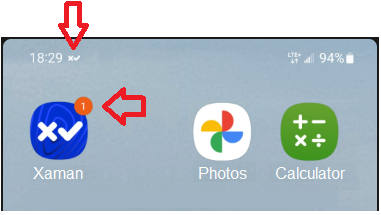
Here is an example from a typical phone running Android:
Notice the at the top of the image and the on the Xaman icon. These are indicators that there has been some activity on your account.
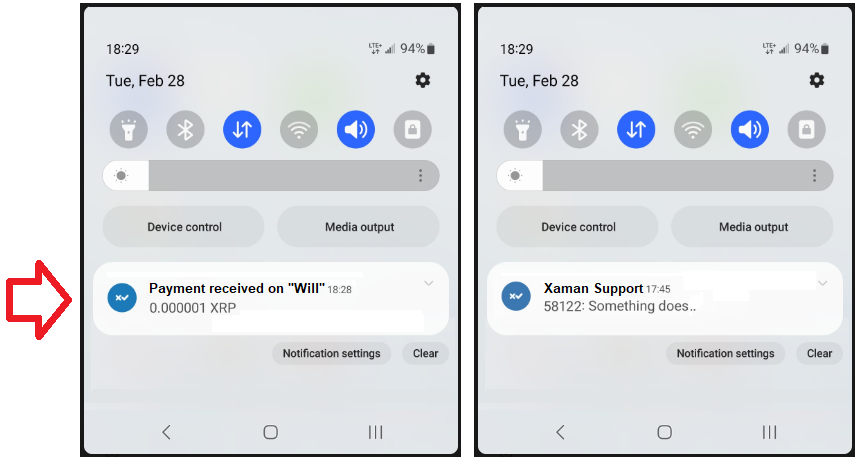
If you tap the you can view the details of the activity. Here are a couple examples of push notifications sent by Xaman:
In the first example, you can see that a payment of .000001 XRP was received in the XRPL account labelled "Will" and in the second example you can see that the Xaman Support team has replied to a ticket created via the [Xaman Support xApp](broken://pages/EtfbIEsDCAwhtCdOHMsR).
#### Where can I find this in Pro?
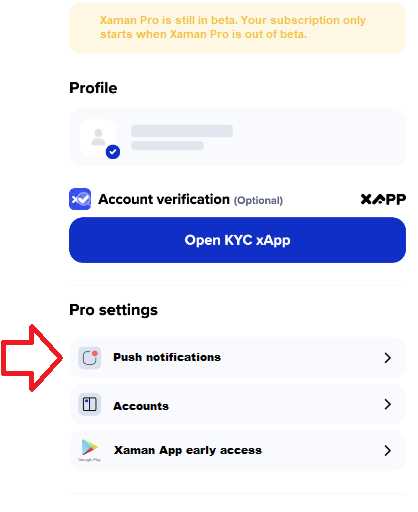
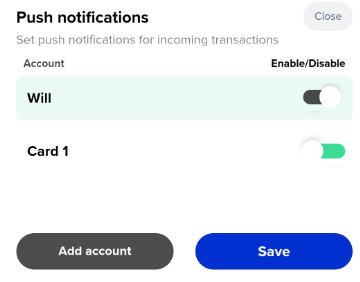
Once you go into the **Push notifications** section, you should see a list of accounts you can enable push notifications for.
This need to be enabled in order to receive push notifications.
### Frequently Asked Questions
#### I am not receiving receiving push notifications while I am in Xaman.
You will only receive push notifications if Xaman is **not running**. If you are in the application, push notifications will not be sent. (You can always check the Events log for any activity on your account.)
#### I was receiving notifications but now I am not getting them any more.
1\) Go into Pro, select **Push Notifications**, then **Disable** the account you are not receiving notifications on.
2\) Exit Xaman, then launch Xaman and launch Pro, select **Push Notifications**, then **Enable** the account.
3\) Exit Xaman, then have someone send XRP to your account to test it.\
\
Note: Basically you are disabling push notifications on the account, then re-enabling push notifications. Remember, Xaman has to be closed in order to receive notifications.
#### I did a conversion payment. Why didn't I receive a notification?
On an exchange (conversion) transaction. That transaction type is outside the notification scope because there is no third party involved in the source+destination. It is a Payment so it is instant. If it was an offer that was passively on the order books and triggered by a third party, then it would have triggered a notification.
From our perspective, it doesn't make much sense to notify for something someone is doing on the spot. You know that you are doing it so why would we notify you of something you are already looking at on the screen.
You will only receive push notifications if Xaman is **not running**. If you are in the application, push notifications will not be sent. (You can always check the Events log for any activity on your account.)
####
---
# Agent Instructions
This documentation is published with GitBook. GitBook is the documentation platform designed so that both humans and AI agents can read, navigate, and reason over technical content effectively. Learn more at gitbook.com.
## Querying This Documentation
If you need additional information that is not directly available in this page, you can query the documentation dynamically by asking a question.
Perform an HTTP GET request on the current page URL with the `ask` query parameter, and the optional `goal` query parameter:
```
GET https://help.xaman.app/app/xaman-pro/features-of-pro/push-notifications.md?ask=&goal=
```
`ask` is the immediate question: it should be specific, self-contained, and written in natural language.
`goal` is optional and describes the broader end goal you are ultimately trying to accomplish on behalf of the user. GitBook uses it to tailor the answer towards what is most useful for that goal.
The response will contain a direct answer to the question and relevant excerpts and sources from the documentation.
Use this mechanism when the answer is not explicitly present in the current page, you need clarification or additional context, or you want to retrieve related documentation sections.
 at the top of the image and the
  on the Xaman icon. These are indicators that there has been some activity on your account.
If you tap the
on the Xaman icon. These are indicators that there has been some activity on your account.
If you tap the  you can view the details of the activity. Here are a couple examples of push notifications sent by Xaman: